 111
111 2
2 3
3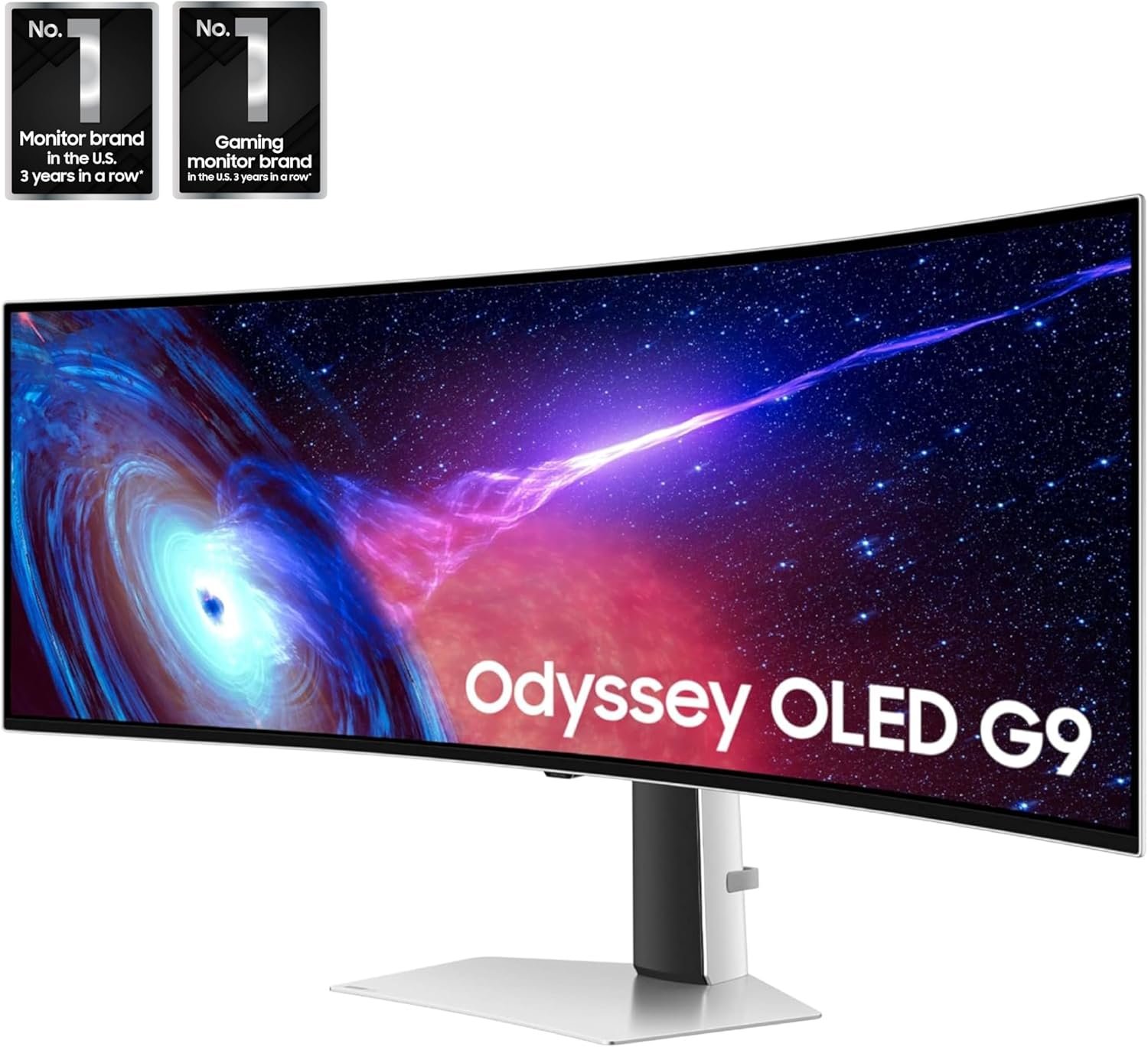
The Samsung 49-inch Odyssey G93SC Series is an ultrawide gaming monitor designed to combine immersive visuals with advanced display technologies. Featuring a QD-OLED panel, a Dual Quad High Definition (DQHD) resolution, a 240Hz refresh rate, and support for adaptive synchronization technologies, it is built for users who want a large-format display suitable for gaming, productivity, and entertainment.
Rather than focusing solely on screen size, this monitor integrates multiple technologies that contribute to image quality, motion clarity, and user comfort. Its curved design also aims to provide a wider field of view while reducing the need for multiple monitors.
This guide explores the monitor’s specifications and technologies, explaining how each feature works and where it may be useful.
The Odyssey G93SC belongs to Samsung’s Odyssey gaming monitor lineup and features a 49-inch ultrawide display with a 32:9 aspect ratio. Instead of using two separate monitors side by side, the monitor provides a continuous display surface equivalent to two 27-inch QHD screens placed together without a bezel in the middle.
Some of its primary specifications include:
Each of these specifications contributes to different aspects of display performance, from image quality to smoother motion and flexible workstation layouts.
One of the defining characteristics of the Odyssey G93SC is its expansive 49-inch display.
Unlike traditional widescreen monitors that use a 16:9 aspect ratio, this model uses a 32:9 format, effectively doubling the horizontal workspace.
This wider display offers additional room for multiple windows, applications, or game interfaces without requiring two separate monitors.
Common uses include:
Because everything appears on one continuous screen, there is no interruption from bezels that would normally separate two displays.
One of the most notable technologies used in this monitor is QD-OLED, which combines Quantum Dot technology with OLED display architecture.
Understanding how this technology works helps explain many of the monitor’s visual characteristics.
OLED stands for Organic Light Emitting Diode.
Unlike conventional LCD displays that require a separate backlight, OLED pixels generate their own light independently.
This allows individual pixels to turn completely off when displaying black areas.
As a result, OLED displays are capable of producing:
Since there is no constant backlight behind the image, darker scenes can appear more detailed.
Quantum Dot technology enhances color reproduction.
Tiny semiconductor particles emit highly precise colors when illuminated.
When combined with OLED technology, Quantum Dots help improve:
This combination is commonly referred to as QD-OLED.
The goal is to provide vivid colors while maintaining the contrast advantages associated with OLED displays.
Some general benefits of QD-OLED displays include:
Because every pixel controls its own illumination, transitions between bright and dark areas can appear more defined.
Quantum Dots allow the display to reproduce a broad range of colors across different brightness levels.
Colors and brightness generally remain more consistent when viewed from different positions.
OLED pixels can change state rapidly, helping reduce motion blur.
The Odyssey G93SC features a 5120 × 1440 resolution.
Samsung refers to this as Dual Quad High Definition (DQHD).
This resolution can be understood as placing two 2560 × 1440 QHD displays side by side.
Instead of:
2560 × 1440the monitor provides:
5120 × 1440This significantly expands horizontal workspace while maintaining the same vertical resolution.
A wider resolution allows more information to be displayed without switching between windows as frequently.
Possible applications include:
For games that support ultrawide resolutions, the additional horizontal field of view can reveal more of the virtual environment.
The Odyssey G93SC uses an 1800R curvature.
The “R” measurement describes the radius of the curve.
An 1800R monitor forms part of a circle with a radius of approximately 1800 millimeters.
On extremely wide displays, the outer edges naturally sit farther from the viewer.
Curving the screen brings those edges closer, helping create a more consistent viewing distance across the display.
Potential benefits include:
The curve is especially noticeable during activities that utilize the full width of the display.
Refresh rate refers to how many times the monitor updates the image every second.
The Odyssey G93SC supports refresh rates up to 240Hz.
This means the display can refresh up to:
depending on the selected settings and connected hardware.
Increasing refresh rate generally reduces the time between displayed frames.
This can contribute to:
Applications that may benefit include:
A compatible graphics card and appropriate connection are required to achieve the monitor’s highest supported refresh rate.
Response time measures how quickly pixels transition from one shade to another.
The Odyssey G93SC is specified with a 0.03 millisecond Gray-to-Gray (GtG) response time.
Fast response times help reduce artifacts such as:
OLED technology naturally enables very fast pixel transitions because each pixel changes illumination independently.
While response time and refresh rate are separate specifications, together they contribute to clearer motion during fast-moving content.
The Odyssey G93SC supports VESA DisplayHDR True Black 400, an HDR certification designed specifically for displays capable of producing deep black levels.
High Dynamic Range (HDR) expands the range between the darkest and brightest parts of an image, allowing greater detail to be visible in scenes with both shadows and highlights.
Instead of increasing brightness alone, HDR content is mastered to preserve subtle details across a wider range of light levels. When paired with self-emissive OLED pixels, dark scenes can retain more depth while bright elements such as reflections, lighting effects, or sunsets can appear more distinct.
Some video games, streaming services, and media applications include HDR-compatible content that can take advantage of displays supporting HDR standards.
One of the defining aspects of the Samsung Odyssey G93SC is its QD-OLED display technology, which combines self-emissive OLED pixels with Quantum Dot technology. Together, these technologies are designed to deliver accurate color reproduction, high contrast, and consistent image quality across a wide viewing angle.
Unlike traditional LCD monitors that rely on a backlight, OLED displays illuminate each pixel individually. This allows black pixels to remain completely unlit, resulting in deeper black levels and enhanced contrast in supported content.
Quantum Dot technology complements OLED by helping produce vibrant and precise colors. This combination is suitable for a variety of tasks, including:
Because colors remain relatively consistent even when viewed from different angles, the display can be useful in collaborative environments or for users who frequently change their seating position.
Screen tearing can occur when the graphics card sends frames at a different rate than the monitor refreshes the image.
To help minimize this issue, the Odyssey G93SC supports NVIDIA G-SYNC Compatible technology.
Rather than operating at a fixed refresh rate, the monitor can synchronize its refresh rate with the output of a compatible NVIDIA graphics card.
Potential benefits include:
The effectiveness of adaptive synchronization depends on the connected graphics hardware, software configuration, and the application’s frame rate.
In addition to G-SYNC compatibility, the monitor also supports AMD FreeSync Premium Pro.
This adaptive synchronization technology is designed for compatible AMD graphics hardware and helps coordinate the monitor’s refresh rate with the graphics card’s output.
FreeSync Premium Pro also supports HDR workflows by maintaining adaptive synchronization while HDR content is displayed.
Features commonly associated with FreeSync Premium Pro include:
Support for adaptive synchronization technologies provides flexibility for users with different graphics hardware platforms.
The Samsung Odyssey G93SC includes multiple video and peripheral connectivity options, allowing it to work with a variety of devices.
Depending on the regional model, available ports may include:
These connections make it possible to connect devices such as:
Using the appropriate cable and hardware is important for accessing supported resolutions and refresh rates.
Large displays benefit from flexible positioning, and the Odyssey G93SC includes an ergonomic stand designed to accommodate different workspaces.
The stand supports several adjustment options, including:
These adjustments can help users position the display more comfortably based on their desk height and seating position.
Proper monitor placement may contribute to improved posture and reduced strain during extended periods of use.
Many users position the top of the display approximately at or slightly below eye level while maintaining a comfortable viewing distance.
Although the Odyssey G93SC is often associated with gaming, its wide display can also support productivity-focused workflows.
The 32:9 aspect ratio provides a large continuous workspace that may reduce the need for a dual-monitor setup.
Examples of productivity tasks include:
Developers may keep source code, documentation, and debugging tools visible simultaneously.
Editors can take advantage of the extra horizontal space for longer timelines while keeping preview windows and editing panels accessible.
Digital audio workstations often contain multiple panels, mixers, and plugin windows that benefit from additional screen space.
Large spreadsheets, dashboards, and market monitoring tools can be arranged across the display without overlapping.
Design applications may display toolbars, asset libraries, and the primary canvas together on a single screen.
The Odyssey G93SC supports a wide range of game genres, particularly those that offer native ultrawide resolution support.
Examples include:
The wide field of view can display more of the track and surrounding environment.
Cockpit instruments and scenery can occupy more of the display, creating an expansive visual workspace.
Supported titles may present a broader horizontal view of the in-game environment.
Large maps and interface elements can remain visible without frequent camera movement.
City-building, farming, and management simulations often benefit from additional workspace for menus and gameplay.
The overall experience depends on whether the individual game supports the 32:9 aspect ratio.
OLED technology provides several image-quality advantages, but like many display technologies, it benefits from proper care.
General maintenance practices include:
Many OLED monitors include automatic maintenance functions such as:
These features are designed to help maintain long-term panel performance.
Leaving static interface elements on-screen for extended periods may increase uneven pixel wear over time.
When practical:
Manufacturers may release firmware updates that improve compatibility, performance, or display management features.
For routine cleaning:
Always follow the cleaning recommendations provided by the manufacturer.
A 49-inch ultrawide display can support a variety of workflows and entertainment uses.
Examples include:
The suitability of any monitor depends on the user’s workspace, hardware compatibility, software requirements, and personal preferences.
Yes. The monitor features a QD-OLED panel, which combines OLED technology with Quantum Dot color enhancement.
The native resolution is 5120 × 1440, commonly referred to as Dual Quad High Definition (DQHD).
The display supports refresh rates of up to 240Hz when used with compatible hardware and the appropriate connection.
A 32:9 aspect ratio provides approximately the same horizontal workspace as two 27-inch QHD monitors placed side by side without a center bezel.
Yes. It supports both NVIDIA G-SYNC Compatible and AMD FreeSync Premium Pro technologies.
DisplayHDR True Black 400 is a VESA certification indicating that the monitor supports HDR content with deep black levels and enhanced contrast characteristics.
Yes. The included stand supports height, tilt, and swivel adjustments to help users position the display comfortably.
Yes. The wide display is suitable for multitasking, allowing multiple applications or windows to remain visible simultaneously.
Not necessarily. Support for ultrawide resolutions varies by game. Some titles offer native 32:9 compatibility, while others may display black bars or use alternative scaling methods.
A higher refresh rate allows the monitor to update the image more frequently, which can contribute to smoother motion when paired with compatible hardware.
The specified Gray-to-Gray (GtG) response time describes how quickly pixels transition between shades, helping reduce motion blur and ghosting.
For many users, the 49-inch 32:9 display provides enough workspace to replace two separate QHD monitors while eliminating the bezel gap between screens.
The Samsung 49-inch Odyssey G93SC Series Curved Gaming Monitor combines several advanced display technologies into a single ultrawide format. Its QD-OLED panel, Dual QHD resolution, 240Hz refresh rate, 0.03ms Gray-to-Gray response time, and support for adaptive synchronization technologies contribute to a feature set designed for high-performance visual experiences.
Beyond gaming, the expansive 32:9 display offers a continuous workspace that can support multitasking, creative applications, software development, media production, and professional workflows. Features such as the adjustable stand, HDR support, and broad connectivity options further enhance its versatility.
Understanding these technologies and specifications can help users evaluate how an ultrawide QD-OLED monitor fits into different computing environments, whether for immersive entertainment, content creation, or everyday productivity.