 111
111 2
2 3
3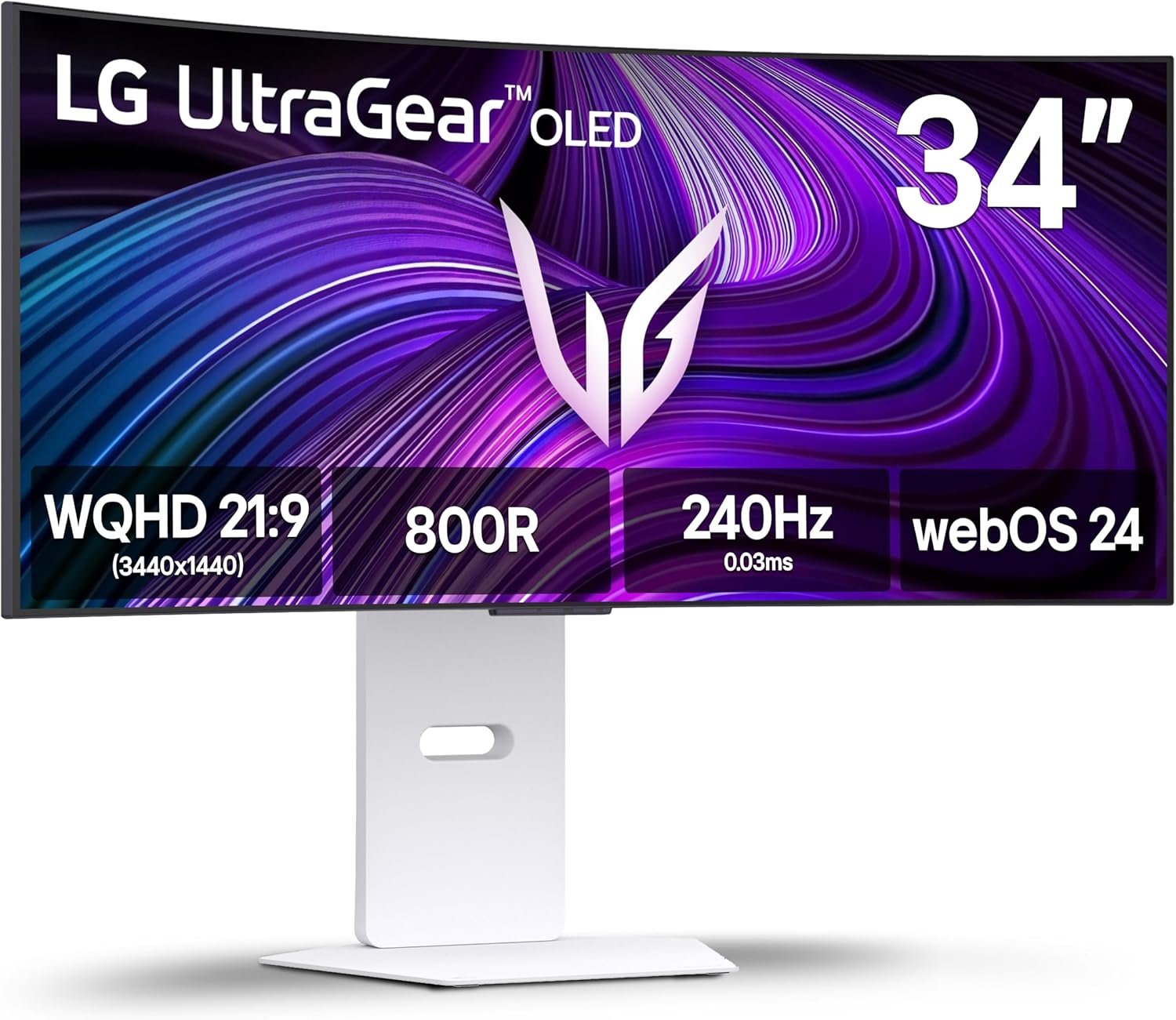
Modern gaming monitors combine high refresh rates, advanced display technologies, and versatile connectivity to support a wide variety of gaming and productivity tasks. The LG 34GX90SA-W is a 34-inch ultrawide OLED monitor featuring a curved WQHD display, a 240Hz refresh rate, and multiple technologies designed to deliver smooth motion, deep contrast, and vivid colors.
This guide explores the monitor’s specifications, explains the technologies it incorporates, and discusses how its features can be used across gaming, content creation, streaming, and everyday computing.
The LG 34GX90SA-W belongs to LG’s UltraGear lineup, which focuses on high-performance displays for gaming enthusiasts and demanding users.
Some of its notable specifications include:
These specifications combine display quality, responsiveness, and connectivity into a single ultrawide monitor suitable for multiple computing scenarios.
One of the defining characteristics of this monitor is its 34-inch ultrawide screen.
Unlike traditional 16:9 displays, a 21:9 aspect ratio provides significantly more horizontal workspace.
Benefits include:
The larger screen also reduces the need for multiple monitors in many workstation setups.
The monitor features a native resolution of:
3440 × 1440 pixels
This resolution is commonly referred to as WQHD Ultrawide.
Compared to Full HD (1920 × 1080), WQHD provides:
The additional horizontal pixels make ultrawide monitors especially useful for productivity software and immersive gaming experiences.
OLED (Organic Light Emitting Diode) technology differs significantly from conventional LCD panels.
Instead of relying on a backlight, each OLED pixel generates its own light.
This design allows individual pixels to turn completely off when displaying black content.
Advantages include:
OLED technology has become increasingly popular among users seeking enhanced image quality across gaming, movies, and creative work.
The LG 34GX90SA-W incorporates a curved display designed to match the natural field of view of the human eye.
A curved monitor can help create a more immersive viewing experience by reducing the distance between the viewer and the screen edges.
Potential benefits include:
The curvature complements the ultrawide aspect ratio by making the full display easier to view from a central seating position.
Refresh rate refers to the number of times a display updates the image every second.
The LG 34GX90SA-W supports:
240Hz
This means the display is capable of refreshing the image up to 240 times per second when paired with compatible hardware.
Higher refresh rates can contribute to:
Applications that benefit from higher refresh rates include competitive games, racing simulations, sports titles, and fast-paced action games.
Response time measures how quickly pixels change from one color to another.
A 1ms response time helps reduce:
OLED technology naturally delivers exceptionally fast pixel transitions, making it well suited for content involving rapid motion.
Screen tearing can occur when the graphics card and monitor update frames at different rates.
The LG 34GX90SA-W supports NVIDIA G-SYNC Compatible technology.
This adaptive synchronization feature helps coordinate the monitor’s refresh rate with compatible NVIDIA graphics cards.
Potential benefits include:
The effectiveness depends on compatible hardware and software configurations.
In addition to NVIDIA compatibility, the monitor also supports AMD FreeSync Premium.
This adaptive refresh technology works with compatible AMD graphics cards.
FreeSync Premium is designed to support:
Support for both major graphics ecosystems increases compatibility across a wide range of gaming PCs.
The LG 34GX90SA-W is certified for VESA DisplayHDR True Black 400.
This certification indicates support for HDR content with enhanced black levels and improved contrast performance compared to standard SDR displays.
DisplayHDR True Black certification focuses on:
Because OLED pixels can switch off individually, HDR scenes often display significant contrast between bright and dark areas.
OLED panels are widely recognized for producing vibrant and accurate colors.
Accurate color reproduction can be beneficial for:
Depending on the software and calibration settings, wide color support can provide more lifelike images across many applications.
Ultrawide monitors are supported by many modern PC games.
A 21:9 aspect ratio may allow users to view a wider portion of supported game environments compared to standard widescreen formats.
Examples include:
Support varies depending on the game and developer implementation.
Although marketed as a gaming monitor, the LG 34GX90SA-W can also support productivity workflows.
The large desktop area allows users to:
For many users, the ultrawide layout can reduce the need for dual-monitor configurations.
The monitor includes USB Type-C connectivity.
USB Type-C has become a versatile interface capable of supporting multiple functions through a single cable.
Depending on the connected device and supported features, USB Type-C may be used for:
This simplifies cable management and supports a cleaner desktop setup.
Unlike traditional monitors, the LG 34GX90SA-W includes webOS, LG’s smart operating system.
webOS enables access to various smart functions without requiring a connected computer for certain supported tasks.
Depending on regional availability and supported services, webOS may provide access to:
These features expand the monitor’s functionality beyond conventional display use.
The monitor features a white exterior finish that distinguishes it from the predominantly black designs commonly found in gaming hardware.
A lighter finish can complement:
The appearance may also coordinate with white PC components and peripherals.
Modern gaming monitors typically support several connection methods.
Depending on the model configuration, users may find ports such as:
These interfaces allow compatibility with desktop computers, laptops, gaming consoles, and compatible accessories.
The LG 34GX90SA-W is designed to accommodate a broad range of computing activities.
Examples include:
Its ultrawide OLED panel and high refresh rate make it suitable for modern gaming systems capable of producing high frame rates.
The combination of high resolution and expansive workspace can benefit video editors, photographers, and designers.
Users may simultaneously manage broadcasting software, chat windows, and gameplay across the wide display.
Multiple documents, browsers, and communication tools can remain visible without frequent window switching.
The OLED display and HDR support contribute to an engaging viewing experience for movies and supported streaming content.
Proper maintenance can help preserve display quality over time.
General recommendations include:
Following these practices may help maintain consistent performance throughout the monitor’s lifespan.
Yes. It features a 21:9 ultrawide aspect ratio with a native resolution of 3440 × 1440 pixels.
Yes. It uses an OLED panel, allowing individual pixels to produce their own light for deep black levels and high contrast.
The monitor supports a refresh rate of up to 240Hz when used with compatible hardware and connections.
Yes. It supports both NVIDIA G-SYNC Compatible and AMD FreeSync Premium technologies.
USB Type-C can support video transmission on compatible devices and configurations.
It is a VESA certification indicating support for HDR content with enhanced black performance and improved contrast characteristics.
Yes. The monitor includes LG’s webOS platform, providing access to supported smart features and applications without relying solely on a connected PC.
The LG 34GX90SA-W 34-inch UltraGear WQHD OLED Curved Gaming Monitor combines several modern display technologies into a single ultrawide format. Its OLED panel, 3440 × 1440 resolution, 240Hz refresh rate, adaptive sync compatibility, DisplayHDR True Black 400 certification, USB Type-C connectivity, and integrated webOS platform illustrate how contemporary gaming monitors increasingly serve both entertainment and productivity needs.
Understanding the purpose of each feature—from OLED pixel technology and ultrawide resolutions to adaptive synchronization and smart functionality—can help users evaluate how these technologies fit different gaming, creative, and everyday computing scenarios. This broader understanding is useful when comparing display technologies and selecting hardware that aligns with specific workflows or usage requirements.