 111
111 2
2 3
3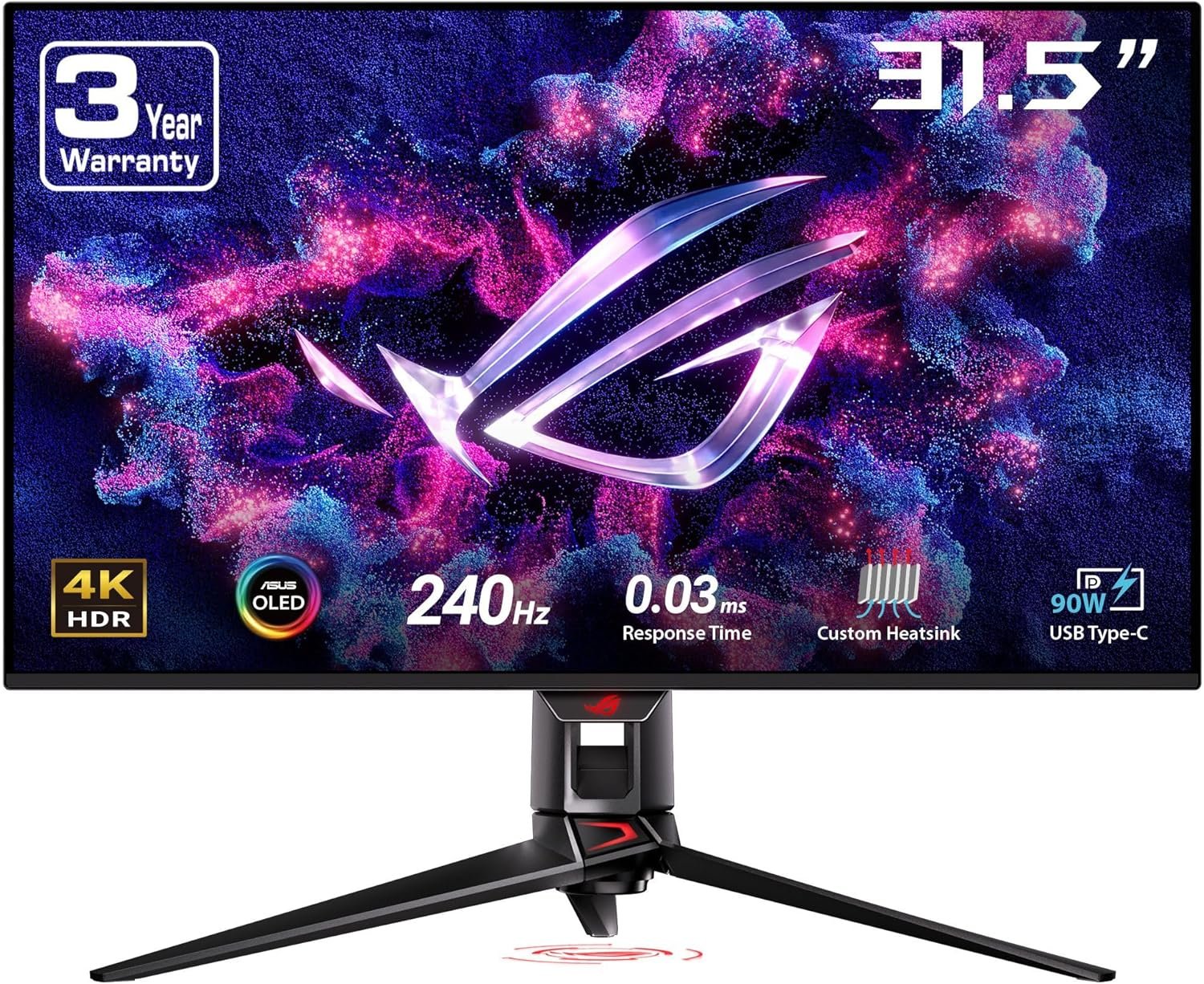
The evolution of gaming displays has accelerated dramatically in recent years, with manufacturers introducing technologies that deliver higher resolutions, faster refresh rates, improved color accuracy, and lower response times. Among these advancements, QD-OLED technology has become one of the most notable innovations for users seeking exceptional image quality and smooth motion.
The ASUS ROG Swift PG32UCDM is a 32-inch gaming monitor designed around these modern display technologies. Combining a 4K UHD resolution, a QD-OLED panel, a 240Hz refresh rate, and USB-C connectivity, it targets users looking for a premium desktop display suitable for gaming, creative workflows, and everyday productivity.
This article explores the monitor’s specifications, display technologies, connectivity, ergonomic features, and ideal use cases. The goal is to provide an informative overview of its capabilities without making purchasing recommendations or subjective evaluations.
The ASUS ROG Swift PG32UCDM features a 32-inch flat display with a native resolution of 3840 × 2160 pixels (4K UHD). It incorporates Samsung’s latest QD-OLED panel technology, which combines the deep blacks associated with OLED displays and the enhanced color performance enabled by Quantum Dot technology.
Key specifications include:
These specifications position the display among modern high-end desktop monitors intended for demanding visual applications.
One of the defining characteristics of this monitor is its Ultra High Definition (3840 × 2160) resolution.
Compared with Full HD (1920 × 1080), 4K provides four times as many pixels.
Benefits of higher pixel density include:
Users editing photos, videos, or working with multiple windows often benefit from the additional screen real estate available with 4K displays.
Gaming titles that support high-resolution textures may also display increased environmental detail when rendered at native resolution.
The monitor uses a Quantum Dot OLED (QD-OLED) display panel.
Unlike traditional LCD displays that require a backlight, OLED pixels emit their own light individually.
Adding Quantum Dot technology helps improve:
Because each pixel can turn completely off, OLED displays are capable of producing:
This makes QD-OLED suitable for both HDR content and scenes with significant brightness variation.
Traditional LED monitors rely on zones of backlighting.
OLED displays illuminate each individual pixel independently.
This design enables:
Dark scenes can display true black pixels adjacent to bright highlights.
Individual lighting minimizes blooming around bright objects.
OLED transitions occur significantly faster than most LCD technologies.
Since no backlight is required, uniform brightness across the panel is improved.
Refresh rate measures how many times a display updates every second.
The ASUS PG32UCDM supports a 240Hz refresh rate.
Compared to:
A 240Hz panel refreshes images much more frequently, producing smoother animation during supported content.
Higher refresh rates may benefit:
Actual frame rates depend on the connected computer and graphics hardware.
The monitor specifies a 0.03 millisecond Gray-to-Gray (GTG) response time.
Response time measures how quickly pixels transition between shades.
Lower response times help reduce:
OLED technology naturally enables faster pixel transitions compared to conventional LCD panels.
The display supports NVIDIA G-SYNC Compatible adaptive synchronization.
Adaptive sync allows the monitor refresh rate to dynamically match the frame rate produced by the graphics card.
This synchronization can help reduce:
Many modern graphics cards also support variable refresh technologies through industry standards.
The monitor covers 99% of the DCI-P3 color space, a wide-gamut standard commonly used in digital cinema and creative production.
Wide color coverage allows displays to reproduce more saturated colors than standard sRGB monitors.
This can be beneficial for:
Users working with color-managed workflows often rely on wider color spaces during content creation.
The ASUS PG32UCDM supports True 10-bit color.
Compared with 8-bit displays, 10-bit color increases the number of available color shades dramatically.
Advantages include:
This capability is especially relevant when working with HDR images and professional media.
High Dynamic Range (HDR) expands both brightness and contrast capabilities.
HDR-compatible displays can present:
HDR content is increasingly available across:
Proper HDR reproduction depends on both the display and compatible content.
OLED panels require thermal management to maintain consistent performance over long periods.
The PG32UCDM incorporates:
These components assist with heat dissipation without requiring active cooling fans.
Passive cooling systems operate silently while helping distribute heat generated during extended operation.
Graphene is known for its excellent thermal conductivity.
Within the monitor, graphene film assists in moving heat away from sensitive display components.
Improved heat distribution contributes to:
The monitor includes a USB Type-C connection capable of delivering up to 90 watts of power.
USB-C supports multiple functions through a single cable:
Compatible laptops can often receive display output and charging simultaneously, reducing cable clutter.
Depending on configuration, users may connect devices through interfaces such as:
These options allow compatibility with:
Connection availability may vary depending on firmware and regional product versions.
A 32-inch display provides a balance between immersion and desktop usability.
Compared with smaller monitors, users gain:
Many users choose 32 inches as a suitable size for both productivity and entertainment without requiring an ultrawide format.
Modern games can benefit from several display technologies featured in this monitor.
These include:
Different game genres may emphasize different aspects of display performance depending on engine design and supported graphical features.
Creative professionals often require displays with broad color coverage and accurate image reproduction.
The monitor’s specifications make it suitable for workflows involving:
Support for wide color gamuts and 10-bit color assists software capable of color-managed editing.
Although designed as a gaming monitor, the display also supports everyday productivity.
The 4K resolution allows users to comfortably arrange multiple application windows simultaneously.
Common office tasks include:
The additional desktop space can improve workflow efficiency compared to lower-resolution displays.
Gaming monitors in the ROG Swift lineup typically include adjustable stands designed to improve viewing comfort.
Common adjustments include:
Proper ergonomic positioning can help reduce neck strain during extended computer sessions.
Modern display technology increasingly incorporates features intended to reduce visual fatigue.
Depending on configuration, users may encounter features such as:
Individual comfort varies according to viewing distance, ambient lighting, and usage duration.
OLED displays commonly include integrated panel maintenance functions intended to preserve long-term image quality.
These may include:
Such features operate automatically or can be activated through monitor settings.
The monitor’s feature set aligns with a variety of computing activities.
Examples include:
Actual user experience depends on the capabilities of connected hardware and software.
The ASUS ROG Swift PG32UCDM combines several modern display technologies into a single 32-inch 4K monitor. Its QD-OLED panel delivers pixel-level illumination, while the 240Hz refresh rate and 0.03ms response time support smooth motion rendering. Additional features such as 99% DCI-P3 color coverage, True 10-bit color, NVIDIA G-SYNC Compatible technology, a custom passive cooling system with graphene film, and USB-C with 90W Power Delivery contribute to a versatile feature set suitable for gaming, content creation, and productivity.
As display technology continues to evolve, monitors integrating high-resolution panels, OLED contrast, wide color gamuts, and advanced connectivity provide users with tools capable of supporting a broad range of visual computing tasks. Understanding these specifications can help readers better appreciate how modern monitor technologies function and the types of applications they are designed to support.